
Use AI and SaaS at work. Keep sensitive data out.
Block sensitive AI prompts, clean up public cloud files and risky OAuth apps, run user access reviews, and resolve issues with employees in Slack or Teams. Mask sensitive values in ChatGPT prompts on Chrome and Edge.
Explore the platformLive security workflows across AI prompts, cloud files, and OAuth apps
Security Console
Live feed


Trusted by 190+ organizations · 10,000 sensitive messages blocked before reaching LLMs every day





SaaS. AI. People.
One security platform.
Replace disconnected awareness tools, Shadow AI blockers, and access-review spreadsheets with one platform built for IT and security teams.
Close public links and risky shares
with the file owner.
Find exposed files and sensitive sharing across Google Drive, SharePoint, OneDrive, Teams, Slack public channels, Dropbox, and Confluence. Ask owners in Slack, Teams, Google Chat, or email via Sam, or remove specific external recipients directly.
Explore data protection
Inventory Shadow IT, govern OAuth,
and automate access reviews.
Combine Google Workspace, Microsoft 365, Dropbox, and Okta visibility with live browser discovery. Alert on SaaS vendor breaches and Critical/High CVEs, run access reviews across 46 identity connectors plus CSV or screenshot imports, and export PDF/CSV audit packs.
Explore apps & access


Let teams use ChatGPT and Claude
without leaking sensitive data.
Mask sensitive values in ChatGPT prompts on Chrome and Edge. Block sensitive prompts and text or code uploads in ChatGPT, Claude, Gemini and Copilot on Chrome, Edge, Firefox and Safari.
Explore AI security
Turn real mistakes and reported emails
into lasting security habits.
Run email and QR phishing simulations in 8 languages, triage suspicious emails reported via Gmail and Outlook add-ins with AI suggestions, turn real attacks into sanitized simulation drafts in 1 click, and trigger short coaching after risky actions.
Explore phishing & trainingSecurity works better
when everyone
plays a part.
Your employees know why a file was shared or an app was connected. Sam reaches them in Slack, Microsoft Teams, Google Chat, or email with 1-click fixes, and Playbooks auto-remediate unanswered issues after your grace period.
 Slack · Teams · Google Chat · Email
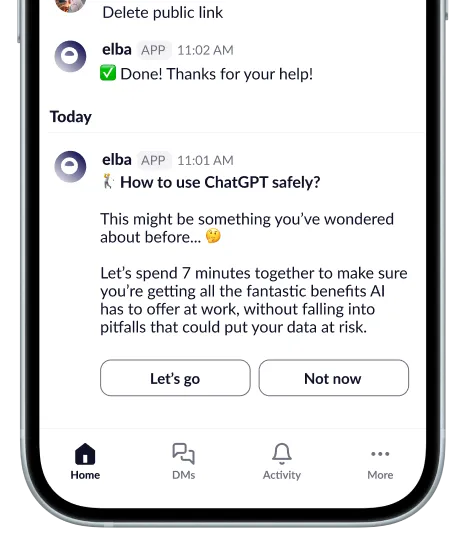
Less chasing.
More risks resolved.
Connect cloud APIs and browsers in minutes.
Connect Google Workspace, Microsoft 365, Slack, Okta, and 220+ apps via OAuth or SCIM, and push the browser extension via Intune, GPO, macOS MDM, or RMM without endpoint agents.
Mask AI prompts and route fixes to owners.
Automatically block sensitive prompts in ChatGPT, Claude, Gemini, and Copilot, and let Sam ask file or app owners for context right where they work. Mask sensitive values in ChatGPT prompts on Chrome and Edge.
Auto-remediate and export audit records.
Clean up unanswered exposures automatically after your grace period, and export dated PDF, CSV, and ZIP evidence for ISO 27001, SOC 2, and NIS2.
Connect the tools
your team relies on.
Unify visibility across 222 native API and SCIM integrations, including Google Workspace, Microsoft 365, SharePoint, OneDrive, Slack, Teams, Dropbox, Confluence, Okta, and Workday Learning, plus 4 managed browsers.
222 API & SCIM connectors · Chrome, Edge, Firefox & Safari 26+
Browse all 226 integrations222 API & SCIM · 4 browsers











Identity · Collaboration · Business applications
Built for your
security review.
Is Elba only a browser extension, or does it connect to our cloud apps too?
Elba combines both: 222 native API and SCIM integrations (including Google Workspace, Microsoft 365, SharePoint, OneDrive, Slack, Teams, Dropbox, Confluence, plus Okta and Workday Learning) and a managed browser extension for Chrome, Edge, Firefox, and Safari 26+ (on macOS 26+).
How does AI prompt masking differ from blocking ChatGPT or Claude?
Mask sensitive values in ChatGPT prompts on Chrome and Edge. Block sensitive prompts and text or code uploads in ChatGPT, Claude, Gemini and Copilot on Chrome, Edge, Firefox and Safari.
Will Elba flood our lean IT team with alerts?
No. Playbooks route routine file-sharing, OAuth, and MFA checks directly to the employee via Sam in Slack, Microsoft Teams, Google Chat, or email, and can automatically remediate issues if they remain unaddressed after your configured grace period.
Does Elba store raw employee AI prompts or train AI models on our data?
No. Browser DLP findings store classifications, SHA-256 hashes, and metadata rather than raw prompts or raw file contents. Customer data is never used to train AI models.
Where is customer data hosted, and what certifications does Elba hold?
EU core customer databases run on OVHcloud, US core customer databases run on Neon (aws-us-east-1), and AI model inference runs on OVHcloud AI Endpoints in Gravelines, France. Elba’s SOC 2 Type II report and ISO/IEC 27001:2022 certificate are available upon request via [email protected].
Give your team
a safer way to work.
Protect cloud files, govern OAuth and user access, mask sensitive AI prompts, and train employees in one platform.